
Understand Your Internet & Network Costs
(So You Can Finally Eliminate Connection Issues and Budget Surprises)
📘 In this series we will shine a light on how creative firms can predict and control their real technology spend.
Part 1: Why Are Technology Costs So Vague and How Can You Get Clarity?
Part 2: The Simple Formula to Find Your True Monthly Cost per Computer
Part 3: How to Track and Budget Your Email & Cloud Subscriptions
Part 4: Understand Your Internet & Network Costs
Is This You?
Paying premium prices for a connection that feels mediocre.
Your team complains about slow Wi-Fi, but the provider insists everything looks fine on their end.
Zoom calls freezing right in the middle of an important sentence.
Constantly restarting the router because it’s the only thing that "sometimes fixes it."
Wireless printers that stop working exactly when you’re in a rush.
Spoiler: These issues aren’t normal and they can be solved permanently.
You might be thinking, “Why are we talking about networking problems? I thought this was about costs?”
Answer: Because understanding the what, how, and why behind your Internet and network gives you the full picture, so your budgeting actually matches reality.
Why Networking Deserves a Spotlight in Tech Costs
Think of your network as the plumbing, gas, and wiring of your studio. You could design the most beautiful kitchen on the planet, complete with a commercial stove and dream appliances, but if the gas pressure is unreliable or the wiring shorts, none of it works as intended (and the chef is left fuming).
Your network does the same for your business:
It connects every tool, document, and conversation, directly impacting your team's speed, calm, and bottom line.
Here's what I've seen after working with firms like yours:
Some clients come to me with a neglected, limping connectivity and that’s the very reason they reach out.
Others inherit “overbuilt” setups from IT partners who got a bit too excited about the tech, leaving the business with complexity, unnecessary costs, and a sense of, “Wait… what exactly did we pay for?”
Both stories lead to the same problem:
When business owners don’t fully understand their connectivity needs, costs become impossible to manage, and the experience almost always ends up unreliable, complicated, and frustrating.
But the good news?
When you break down your networking into simple, predictable cost buckets, surprise outages, and anxiety melt away.
Let’s Dive in and Create Two Buckets: Hardware & Services (Keep It Simple)
Bucket 1: Hardware Costs
Firewall
Network switch(es)
Wi-Fi access points
Bucket 2: Service Costs
ISP bill (your internet provider)
Phone system (VoIP)
Mobile data reimbursement (where relevant)
IT partner’s network management
Security subscriptions tied to hardware
Everything fits neatly into one (or both!) of these categories.
Hardware: What You Own, When to Replace
The biggest misconception I tackle?
Network hardware is “forever”. As long as the lights are on, people assume it’s doing its job.
Let’s be honest: None of these devices get a day off. Your firewall, switches, and Wi-Fi access points are running, non-stop, 24/7/365. Imagine leaving the oven, bath, and every light in your studio cranked at all times. Wear and tear is inevitable!
And here’s the rub:
Old hardware slowly hobbles productivity. Bottlenecks build. Calls drop. Latency creeps in.
Your team suffers in silence for months, thinking the problem is just… “the internet.”
Like driving on bald tires: Sure, you can go a little longer, but a blowout at the wrong time is catastrophic.
My Rules for Replacement Cycles (for a 5 to 30 people team):
Firewall (replace every 3 years)
Think of it as the doorman always watching what comes in what goes out.
It must keep up with modern security standards while working efficiently to get things in and out the door fast.
Typical Cost: $2,000 + $500 install/labor = $69/month
Network Switch (replace every 5 years)
Think outlets throughout your house. This is how you get to plug many things in and get stable and constant connection at every outlet.
Typical Cost: $1,000 + $300 install/labor = $22/month
Wi-Fi Access Points (replace every 5 years)
Delivers wireless connection to your devices from laptops to printers.
Wi-Fi standards and tech around performance move quickly.
Typical Cost (2 Access Points): $1200 ($600 each) + $300 labor per AP = $25/month
How Does It All Connect?
Incase you are a visual person like me and wondering, here you go:
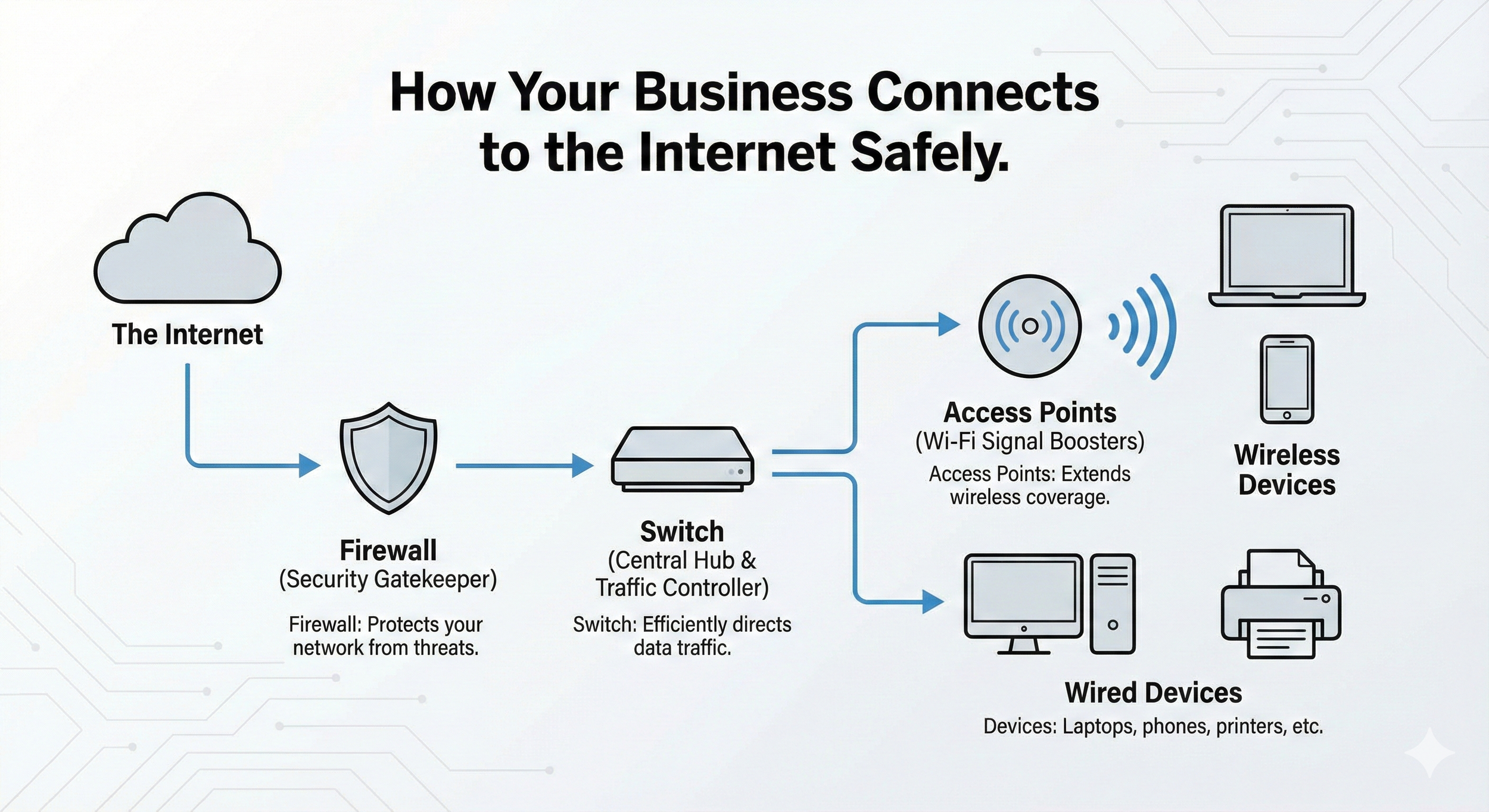
Service Costs: Predictable, Monthly, Easy to Budget
Internet Service Provider (ISP)
Most businesses quietly overpay, sometimes by 30–50%, because contracts auto-renew without negotiating better terms..
Golden Rule:
Always sign a 3-year contract. Set a calendar reminder for one month before expiration and renegotiate before getting locked into a higher rate.
Premium business-grade internet: ~$250/month
Phone System (VoIP)
Let’s break a myth:
Cell phones ≠ business phone system.
Personal numbers introduce privacy and professional risks, and your team will love NOT getting business calls on their personal phones even if they say “oh, it doesn’t bother me”
Modern VoIP phone system means:
App on cell/computer, or optional desk phone
One unified business number
Voicemail and call flows managed easily
Team member leaves? Their number stays.
~ $35/user/month = ~$350–400/month for 10 staff
All delivered through your network setup, so if the network’s shaky, the phone system suffers too!
IT Partner Network Management
Someone has to keep things running because problems with Internet access impact everyone at once. This is why we include managing the network, your ISP, and all connectivity as part of our services but not all IT partners do.
If “management” isn’t clearly in your IT plan, incidentals pile up fast.
This is your line item for:
Proactive monitoring
Updates & patching
ISP wrangling (so you’re not on hold for hours)
Budget this as a monthly line item, or confirm it’s genuinely included in your service agreement.
Let’s Do the Math: 10-Person Creative Firm
Hardware Monthly:
Firewall: $69
Switch: $22
Access Points: $50
Total Hardware: $141
Services Monthly:
ISP: $250
Phone: $400
Network management: (estimate/confirm with provider)
Total Services: ~$650
Grand Total Networking + Internet:
~$791 per month
Why does this matter?
Because knowing your number means you can finally predict when budgets are due, which upgrades are truly needed, and stop treating your network as an anxious game of chance.
The Real Cost of Downtime: A Reality Check
A quick reality check:
Let’s say you’re a 10-person architecture studio with billable rates averaging $250/hour.
If your network is down for just one hour:
The business doesn’t just lose out on the salaries while people “wait”
You’re losing potentially $2,500 in billable work
And you still have to make up the lost time, often at overtime rates
One hour of downtime can approach $4,000–$5,000 in real cost, all because of an issue that’s far cheaper to prevent than to fix in real-time.
Now let’s be honest, Internet outages and problems never last just 1 hour when they happen.
Time to Reclaim Your Calm & Focus
Imagine…
Running your firm without the daily “Is the Wi-Fi working?” anxiety.
Knowing exactly when gear needs replacing, and having a budget in place.
No more Zoom freezes, printer vanishing acts, or the team avoiding certain corners of the studio due to poor wifi.
Clarity isn’t about spending more; it’s about aligning technology with your business priorities, so you can stop worrying and start leading.
Take the Lead, Align Your Partners
Here’s my best advice after years of seeing both chaos and overkill:
Your priorities and your IT partner’s priorities may not always align. And that’s not anyone’s fault. Most IT vendors don’t automatically understand your industry or unique workflow.
But when you’re educated “just enough to be dangerous”, you can ask smart questions, insist on plain English, and align your network (and costs) to fit your business and your journey, not someone else’s template.
So take the lead, or have a trusted team member do so, by reviewing your network hardware and internet service with your IT partner or provider.
If you want a sanity check, want to map your next steps, or just need to know what should (or shouldn’t!) be in your budget,
I’m here and always happy to chat in plain English.
Previous chapter in the series: How to Track and Budget Your Email & Cloud Subscriptions